
Moodle 5.2 has just been released, and the first question most people ask is: should we upgrade now, or wait for the next LTS version?
With Moodle 5.3 LTS expected in October, it’s a fair question. The short answer is: it depends on how you’re using Moodle. Some sites should move to 5.2 straight away, while others are better off waiting. If you’re not sure which option applies to you, this guide will help you think it through.
Page Index
- Quick answer
- What actually changed in Moodle 5.2?
- The login page finally feels more modern
- Course pages are easier to understand
- Less confusion around restricted content
- Navigation is a bit less clunky
- Small workflow improvements
- Some smaller UI changes that actually make a difference
- Upgrade now or wait?
- Things to check before upgrading
- Themes and upgrade safety
- Theme licensing and upgrade timing
- Final recommendation
Quick answer
If you’re launching a new Moodle site, Moodle 5.2 is usually the practical choice. If your site is large, business-critical, or tied to lots of plugins and integrations, waiting for Moodle 5.3 LTS may be the safer option.
Upgrade to Moodle 5.2 now if:
- You’re starting a new Moodle site
- You want the latest improvements
- Your plugins and theme are already compatible
Wait for Moodle 5.3 LTS if:
- Your site is large or business-critical
- You rely on lots of plugins or integrations
- You typically upgrade every 1 to 3 years
What actually changed in Moodle 5.2?
Moodle 5.2 isn’t a major feature-heavy release. Most of the work has gone into cleaning up the interface and smoothing out everyday workflows. These are the kinds of improvements you notice more in daily use than at first glance.
Moodle is becoming easier to navigate and clearer to understand. These changes have the biggest impact in day-to-day use, especially for teachers, learners, and administrators.
The login page finally feels more modern
The login page has been redesigned with a cleaner, more modern layout. It creates a clearer and more professional first impression, especially for new users.
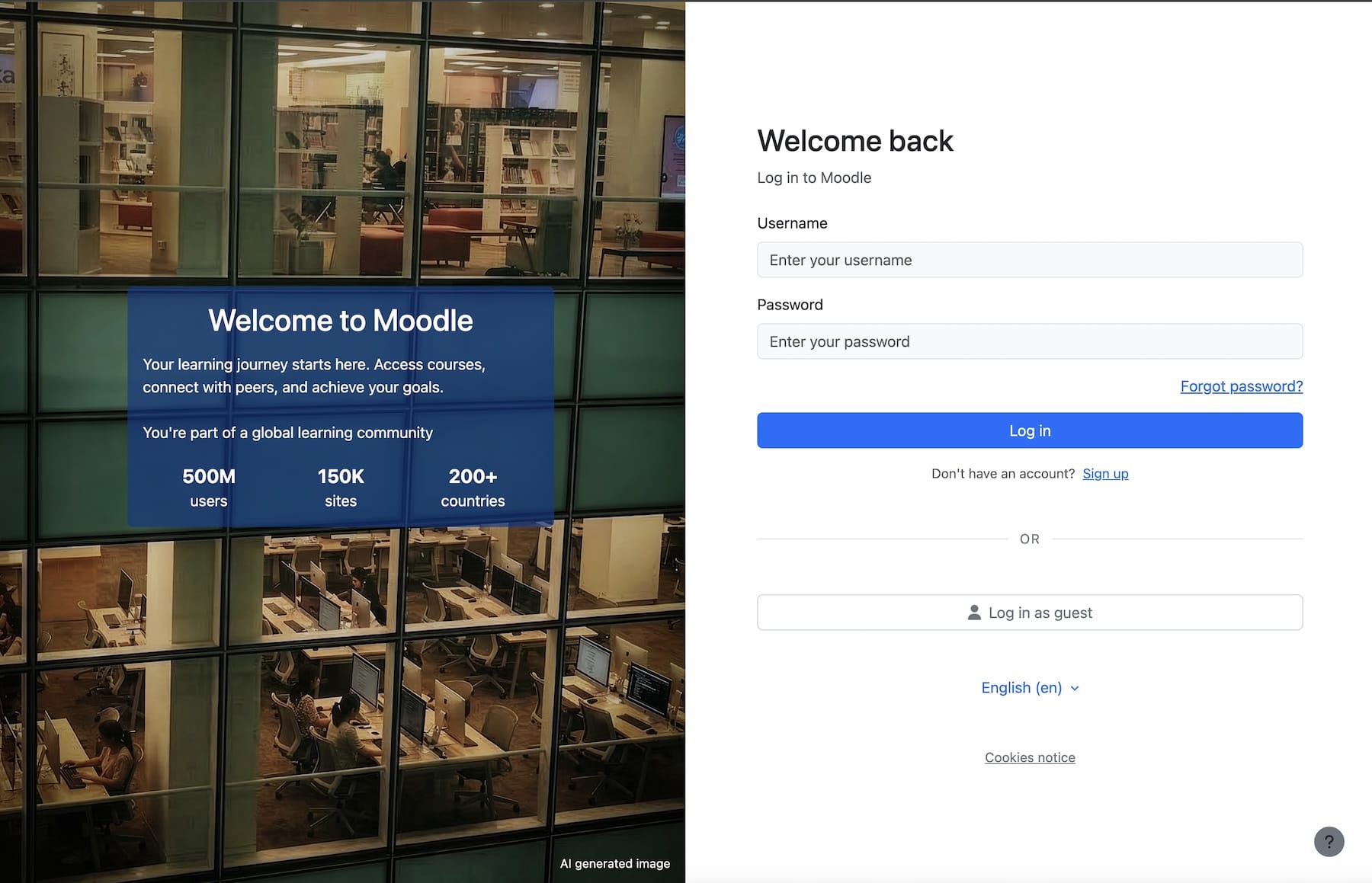
If you’ve used modern Moodle themes, this will probably look familiar. Themes have already been moving in this direction for a while. For example, in our Lumo theme you can choose between different login layouts depending on the kind of experience you want to create.
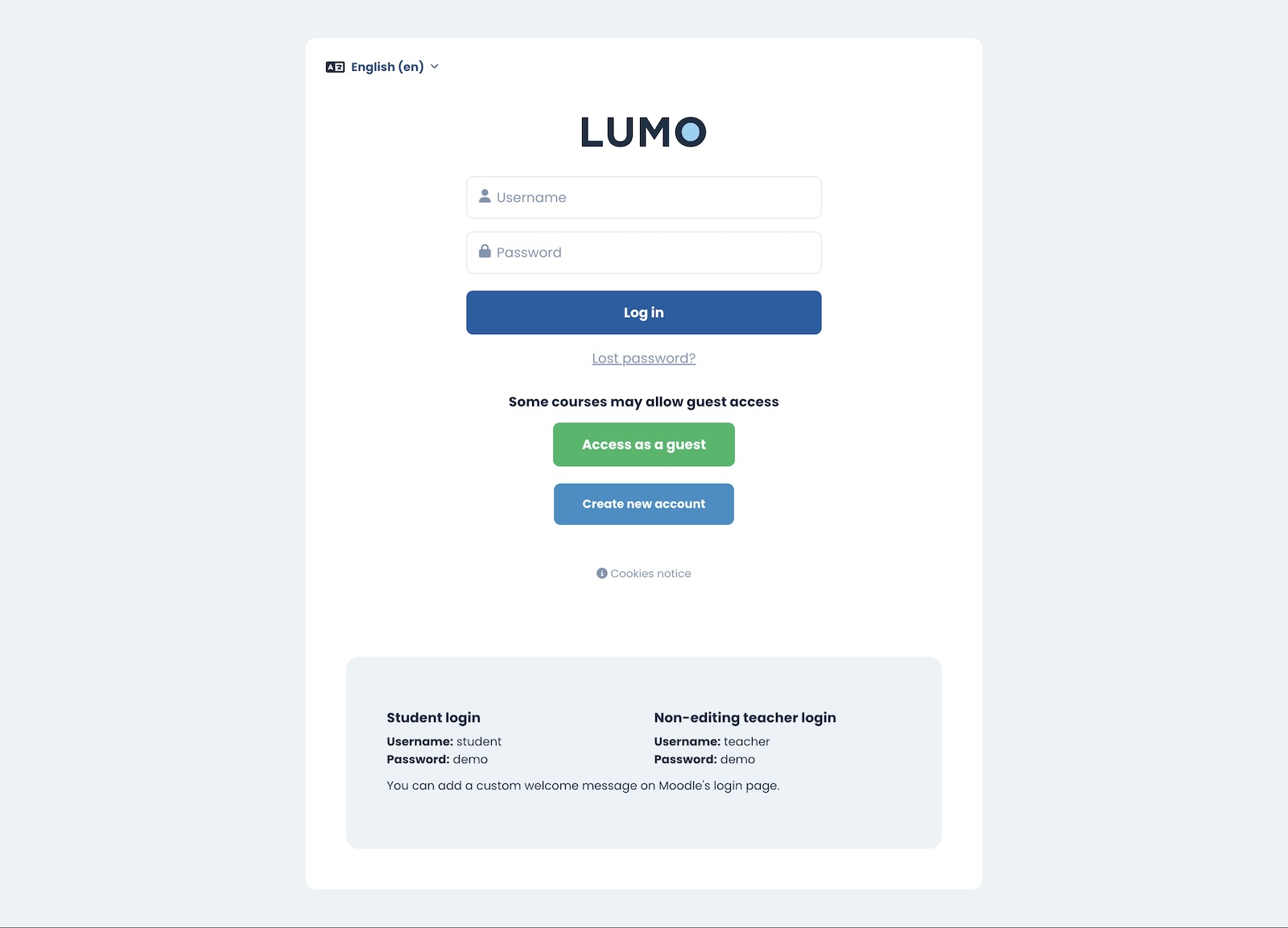
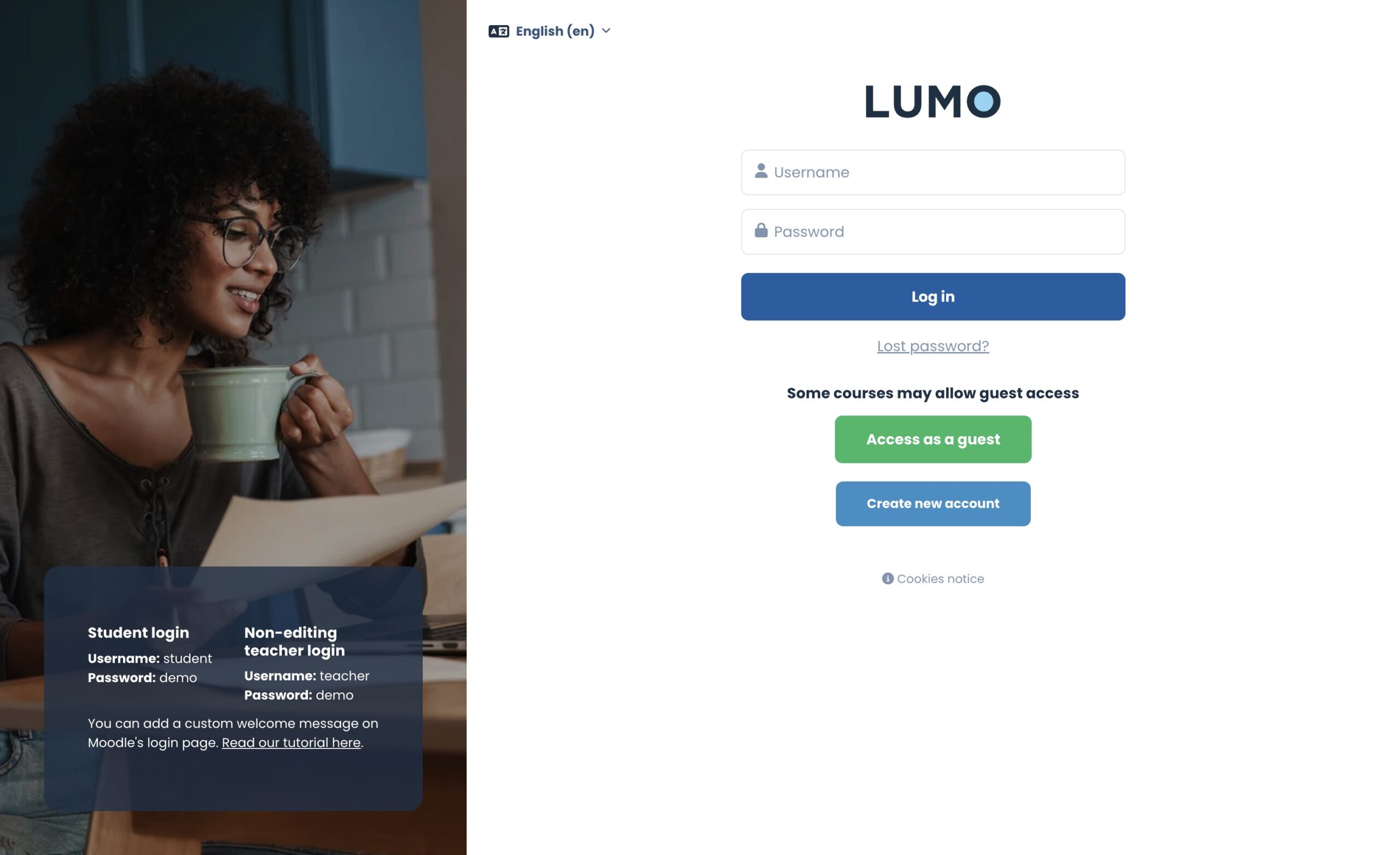
Some sites want a more branded look. Others just want something simple and clear. There’s no single right answer, but Moodle 5.2 does improve the default experience. The theme still makes a big difference to how polished the final result feels.
Course pages are easier to understand
This is one of the most useful parts of the 5.2 update. Key information such as activity dates, completion requirements, and actions is now displayed more prominently at the top of the page, making it easier for learners to understand what they need to do and by when.
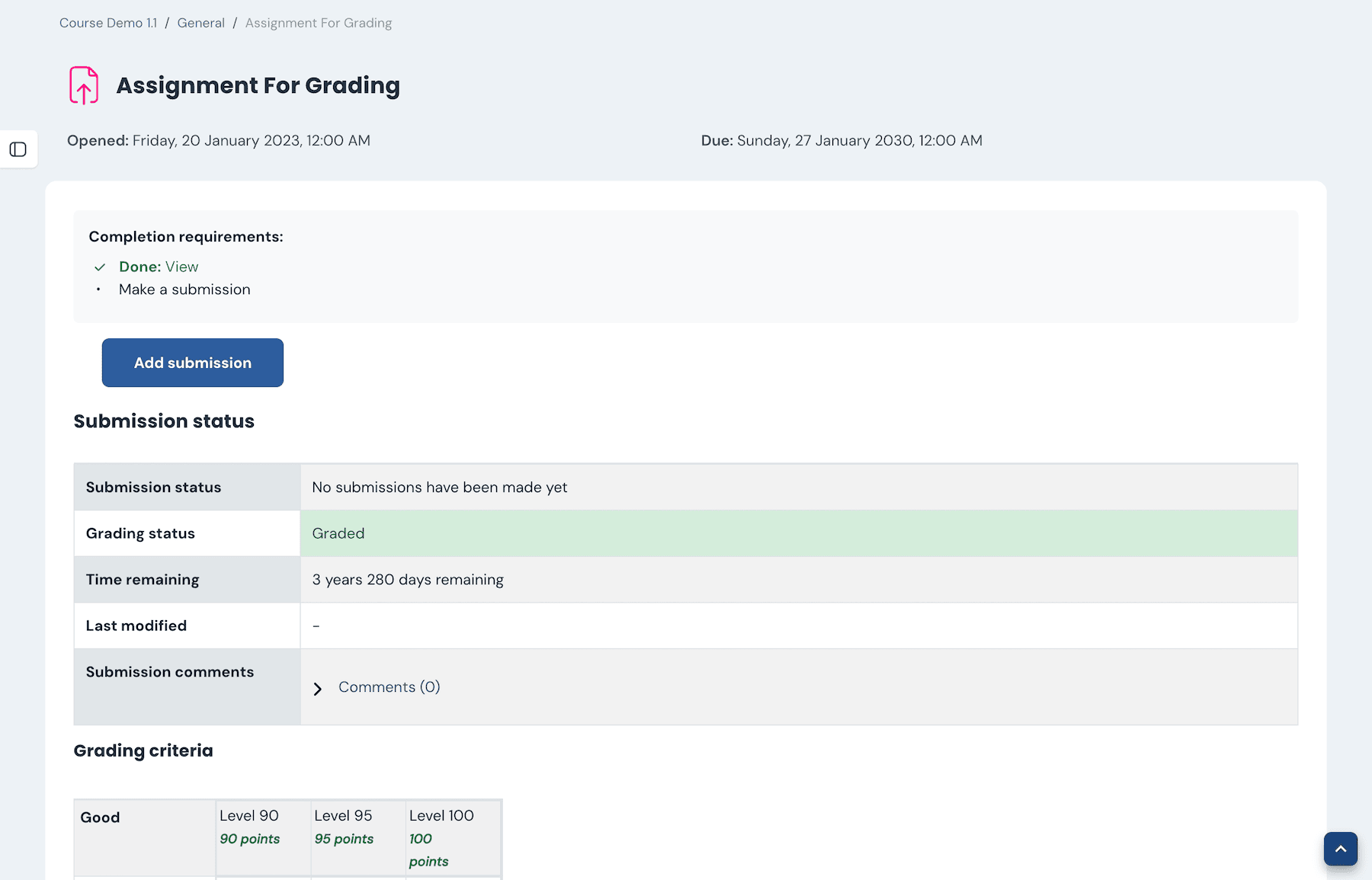
That reduces friction straight away. Learners shouldn’t have to stop and work out what they’re supposed to do next. Moodle 5.2 makes that part more obvious, which is exactly the kind of improvement that helps day to day.
Less confusion around restricted content
Moodle now does a better job of showing why content is restricted and what needs to happen before it becomes available. If you’ve ever had users asking why they can’t access something, this change will help.
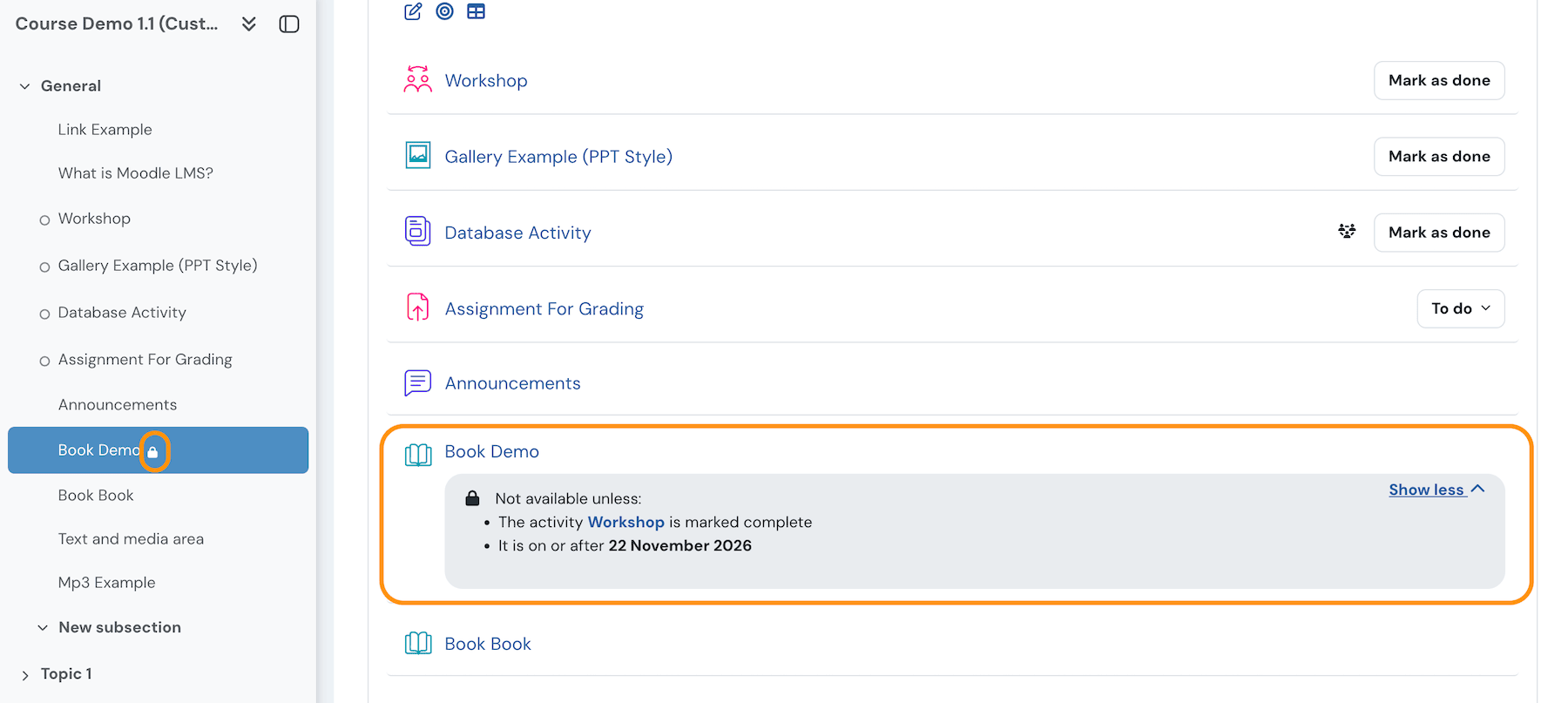
It’s not a major feature on paper, but it removes one of those annoying little points of confusion that keeps coming up in real sites.
Navigation is more streamlined
Subsections have been simplified, and they no longer feel like separate pages. Navigation is quicker, cleaner, and requires fewer clicks, which matters more in larger courses where structure can easily become messy.
This makes it easier to move through a course without unnecessary interruptions.
Small workflow improvements
Moodle 5.2 also includes a number of workflow improvements, particularly in the question bank. Categories can now be expanded and collapsed, edited directly in place, and reorganised using drag and drop. You can also see question counts at a glance and move entire categories more easily.
These changes make it quicker to organise and manage question banks, especially in courses with a large number of questions. Editing workflows across Moodle have also been smoothed out, with less jumping between pages.
For a full breakdown, see the official Moodle documentation: Quiz and question bank usability improvements.
Some smaller UI changes that actually make a difference
These are smaller interface changes, but they make a noticeable difference in day-to-day use.
Course index is more useful
The left-hand course index has been improved in a few subtle but genuinely useful ways. The course name stays visible at the top, completion status is clearer, and restricted items are easier to spot thanks to lock icons.
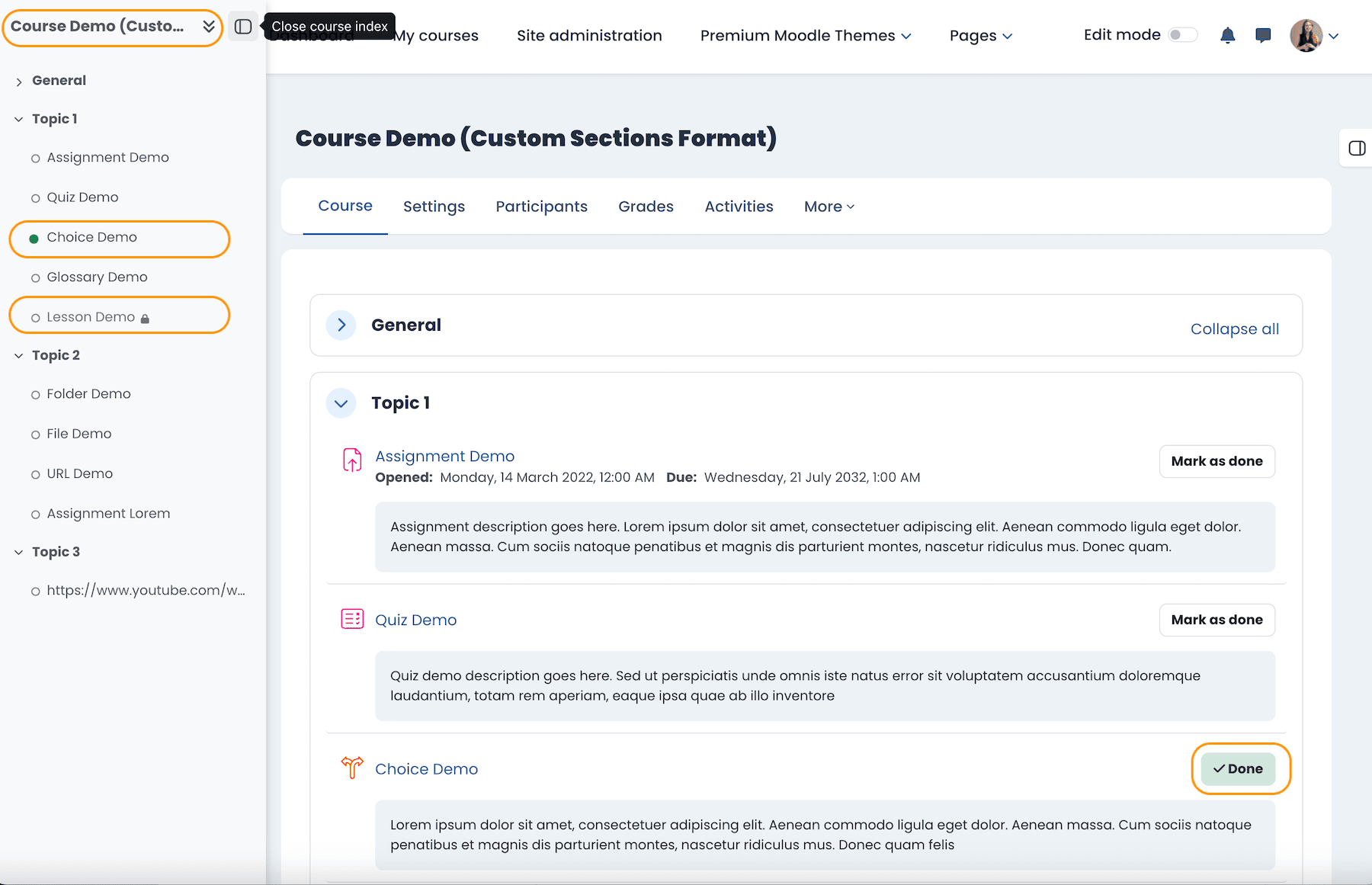
That makes long courses easier to scan and easier to navigate, especially when learners are trying to work out where they are and what they’ve already completed.
Sticky action buttons when editing
When editing an activity or resource, the action buttons now stay visible in a sticky footer as you scroll. That includes Save, Save and display, and Cancel.
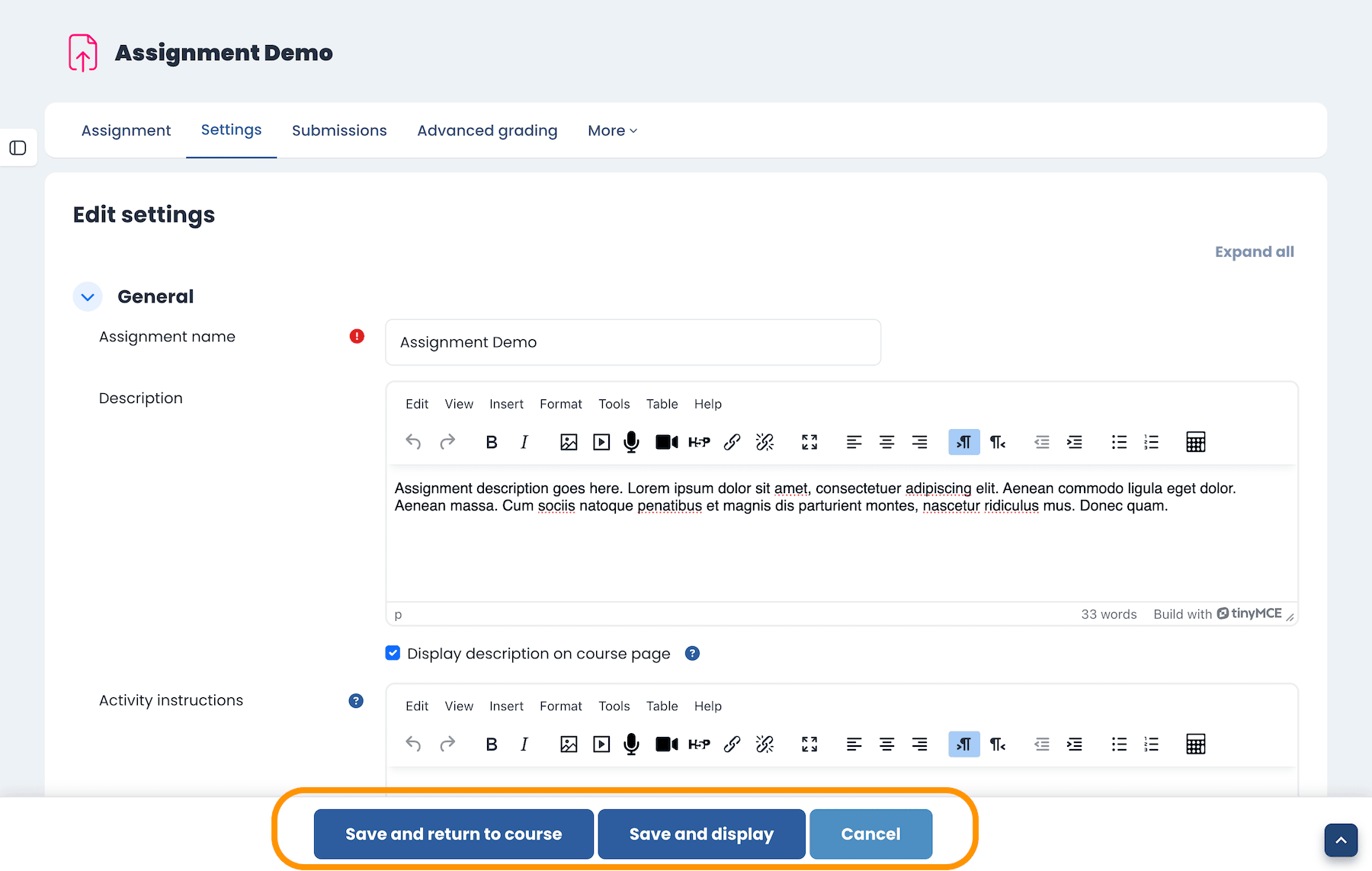
This is a small change, but a good one. On longer forms, not having to scroll all the way back down just to save is a real improvement.
Subsections stay on the same page
In-course subsections no longer open their own separate pages in Moodle 5.2. Instead, users stay within the same page context, which reduces unnecessary clicks and makes the whole course flow feel more connected.
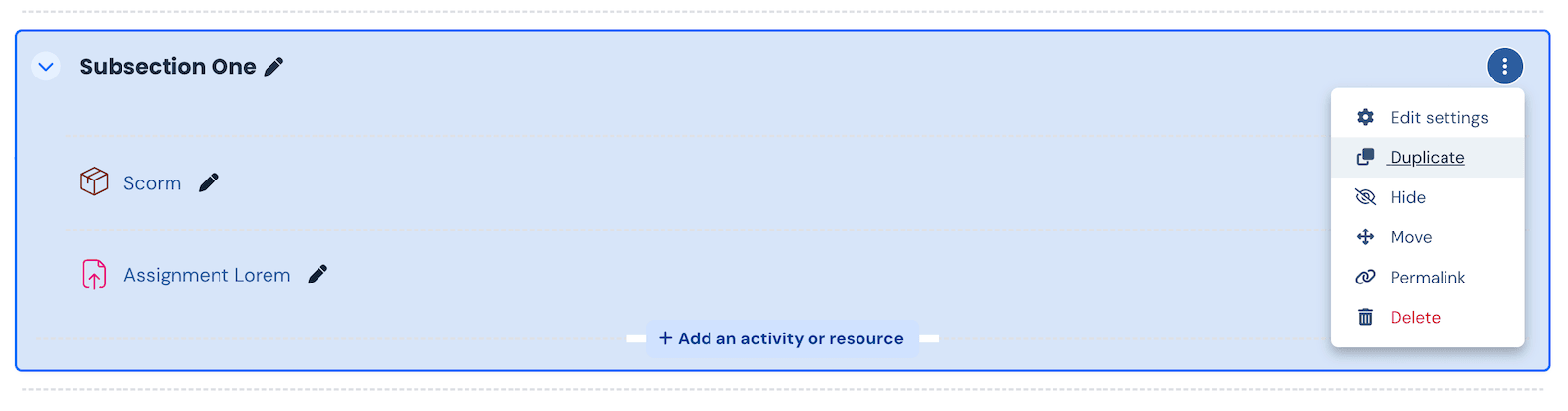
Duplicate subsections
Course editors can now duplicate a subsection directly from the dropdown menu. That’s a small but useful addition if you build out structured courses and want to reuse layouts or content blocks quickly.
Upgrade now or wait?
This is where it becomes practical. Most people aren’t deciding whether to upgrade at all. They’re deciding when.
If you’re starting a new site, using Moodle 5.2 from the start is usually the sensible choice. There’s little benefit in launching on an older version and then upgrading again shortly after.
If you’re running a larger or more complex LMS, waiting for Moodle 5.3 LTS can be a more practical option. You’ll still need to test thoroughly and ensure plugins are compatible, but the advantage is a longer support cycle. Instead of upgrading to 5.2 and then again shortly after, you can move to 5.3 LTS and stay on that version for a longer period.
Things to check before upgrading
Before upgrading, make sure you check plugin compatibility, confirm that your theme supports Moodle 5.2, take proper backups, and test everything in a staging environment first.
- Plugin compatibility
- Theme compatibility
- Backups
- Staging tests
/public/ folder structure. This change can affect your hosting setup, file paths, and deployment process. You may need to update your configuration depending on how your site is hosted. See our Moodle 5 upgrade guide for details.Most upgrade issues don’t come from Moodle core itself. They usually come from plugins and themes.
Themes and upgrade safety
Themes are one of the most common sources of upgrade problems. Heavily customised themes are more likely to break, need patching, or create extra maintenance work after an update.
Themes that stay closer to Moodle core are generally easier to maintain and upgrade. They’re not risk-free, but they usually give you fewer surprises. The larger and more important your site is, the more this matters.
Theme licensing and upgrade timing
One thing people don’t always think about is how theme licensing fits into upgrade decisions. A lot of providers use subscriptions, so you pay every year whether you upgrade your Moodle site or not.
That doesn’t always match how Moodle sites are actually managed. In many cases, especially in universities, upgrades happen every 1 to 3 years rather than every release.
We primarily use a pay-as-you-go model, which means you pay for the version you use and upgrade when you choose. The upgrade cost is much lower than buying a full license again, and there’s no requirement to pay every year if you’re not upgrading.
- Pay for the version you use
- Upgrade when you choose
- Upgrade cost is much lower than a full license
Final recommendation
If you’re starting a new project today, Moodle 5.2 is usually the sensible choice. If you’re running a larger or more risk-sensitive setup, waiting for Moodle 5.3 LTS is often the safer option.
There’s no single right answer for every Moodle site. It depends on your setup, your upgrade cycle, and how much risk you’re comfortable taking on.
Moodle 5.2 doesn’t reinvent the platform, but it does make Moodle easier to use. And in practice, that’s what matters most.
If you’re planning a Moodle 5.x upgrade and want a stable, upgrade-safe design, take a look at our Moodle 5 themes. They’re built on Boost and designed to stay aligned with Moodle core for smoother upgrades.